Zanny Emote: Zanny Fortnite Dance Trend Tutorial
Learn the Zanny emote from Fortnite: where the Zany dance comes from, every move step by step, and how to make a real-life Zanny video from one photo.
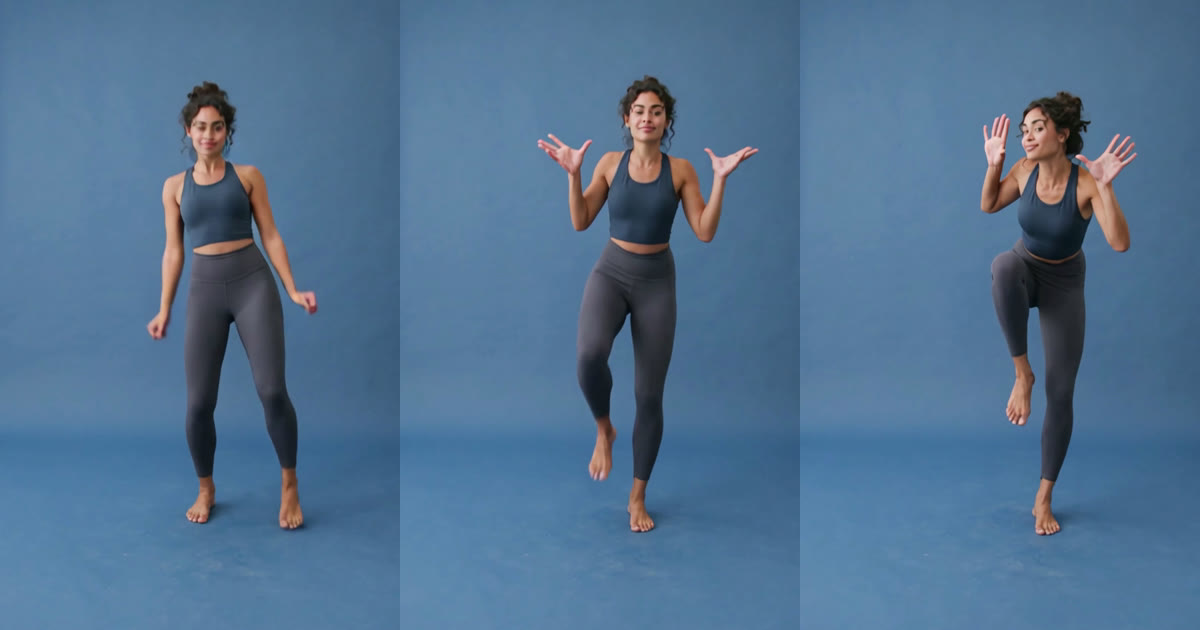
The Zanny emote is one of those Fortnite dances everyone recognizes the second it starts: a loose bounce, wobbly knees, a big shrug and a pair of wiggling hands next to the face. In the game it takes one button. In real life it takes a bit of nerve, or one photo and an AI dance generator.
This guide covers what the Zanny emote is, why it keeps showing up on TikTok, how to do the dance yourself step by step, and how to make your own Zanny video with AI.
What is the Zanny emote?
In Fortnite the emote is spelled Zany, but most people search for it as the Zanny emote. It is a Rare dance emote that came out on May 19, 2018, during Chapter 1 Season 4, with the in-game description “Go ahead, get weird with it.” It costs 500 V-Bucks and is not always available: it rotates in and out of the Item Shop, and trackers last saw it there in May 2026.
The dance itself is pure goofiness. There is no big trick and no fast footwork, just a character bouncing in place, shrugging, kicking a knee up and waving their hands around their head. That is exactly why players use it to celebrate an elimination or to wind up an opponent.
The Zanny emote trend on TikTok
On TikTok the emote lives in POV clips. A typical one shows a skin doing Zany in the locker with a caption along the lines of “POV: you’re in the top 2 and you hear this emote.” Anyone who has played an endgame knows the feeling: you are fighting for the win and your last opponent is dancing at you.
Like the Floss and the Default Dance before it, Zany also works off screen. The moves are simple, silly and instantly recognizable to anyone who plays, so a real person doing them gets a reaction in a way a game clip never does.
How to do the Zanny dance, step by step
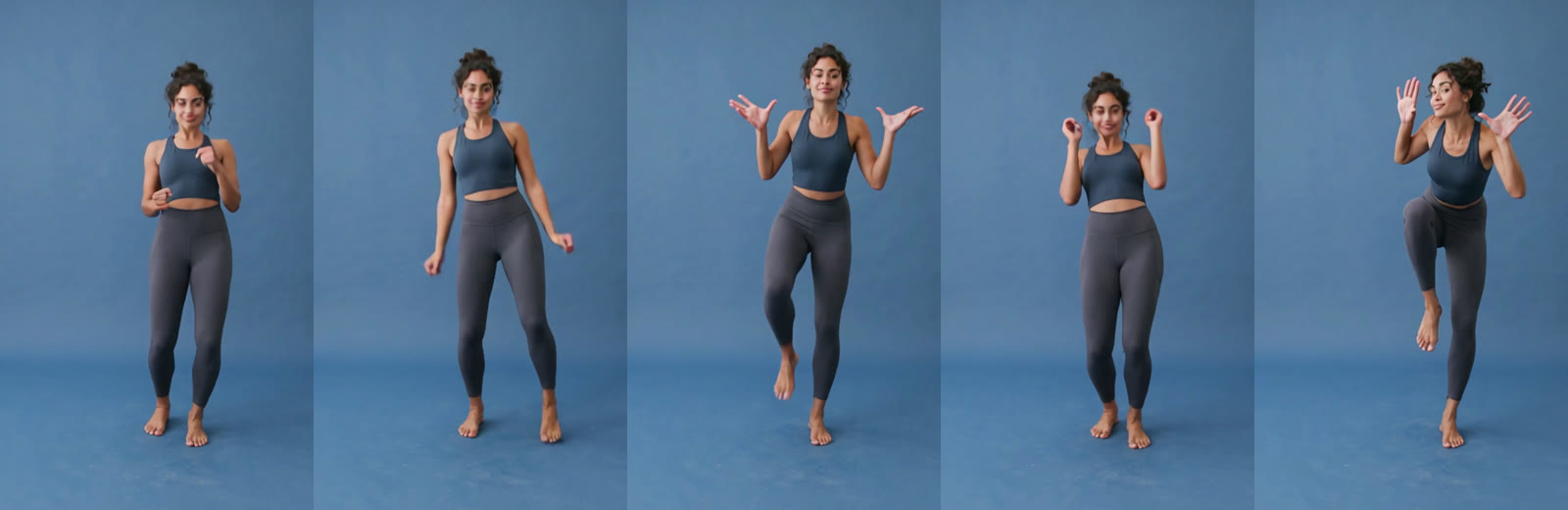
- The bounce. Stand with your feet under your hips and bounce lightly on the balls of your feet, fists loose at waist height, like a slow jog on the spot.
- Wobbly knees. Drop your arms down and out to the sides and let your knees wobble in and out, as if your legs have gone to jelly.
- The shrug. Bring both hands up to shoulder height, palms up and fingers spread, and lift one knee high at the same time.
- Crazy hands. Put that foot down, curl your fingers next to your cheeks, then flick them open.
- The wave. Wiggle your open hands beside your head while the knee comes up again, then drop back into the bounce.
The whole routine loops about every four and a half seconds, so two rounds fill a ten-second video. Keep your knees soft the whole time and go big with your face: the emote only works if you look like you are enjoying it a little too much.
How to make a Zanny emote video with AI
If you would rather not film yourself, an AI dance generator does it from a photo. You upload one picture, and the person in it performs the full Zanny routine on a clean studio backdrop, every move and the timing intact.
- Open the Zanny Emote AI Dance generator and sign in. Signing up is free, with no credit card needed.
- Upload one photo of the person you want to see doing the emote. A full-body shot works best; see the photo tips below.
- Press Generate Video. A Zanny video costs 20 credits, and the price is shown on the button before you start.
- Wait a few minutes while it renders. You can leave the page; the video waits for you in My Projects.
- Download the MP4 and post it. It is vertical, about 10 seconds long and already has sound, so it is ready for TikTok, Instagram Reels and YouTube Shorts.
Photos that work
- Full body, feet included. The knee lifts are half the dance, so a photo cut off at the waist leaves the AI guessing what your legs look like.
- One person, standing, facing the camera. Arms relaxed at the sides is ideal; crossed arms and hands in pockets are harder to animate.
- Sharp and well lit. The dancer faces the camera the whole time, so a clear face makes the biggest difference.
- Wear the outfit you want to dance in. Clothes, hair and shoes all come from the photo, so a gaming hoodie or a skin-inspired outfit is a fun touch.
Is there a free Zanny emote generator?
Signing up for FIKKU is free, with no credit card needed, and you can browse every effect before you pay anything. Making a Zanny emote video costs 20 credits. Credits come in one-time packs with no subscription, and they never expire. If a video fails to render, the credits go straight back to your account.
Tips for posting your Zanny video
- Lean into the POV. A caption like “POV: you’re in the top 2 and I hit the Zanny” tells gamers exactly what they are looking at.
- Tag it #zanyemote, #fortnitedance and #emote, plus one tag about who is dancing, like #dad or #squad.
- Do not trim the start. The bounce begins in the first second, and that is your hook.
- Post when your audience is online. Our guide to the best times to post on TikTok has the details.
Ask before you upload
Only use photos of yourself and of people who are happy to be in the video. Do not upload photos of celebrities, streamers, strangers or anyone who has not agreed to it.
More dance trends
Curious why some dances take off? Read what makes a dance trend go viral. For another classic, see how to make a C Walk AI video, or browse every AI dance effect.